Q-ASN.1: work with ASN.1 made easy!
Support the project:


I have started the development of Q-ASN.1 with the goal of practicing C++. The beginning was only about serializing and deserializing an ASN.1 data structure, and then, step by step, I added a GUI, a Javascript engine, and an ASN.1 compiler.
ASN.1 is an international standard defined by the International Organization for Standardization, the International Electrotechnical Commission and the International Telecommunication Union.
ASN.1 (Abstract Syntax Notation One) specifies a notation meant to describe data structures. The aim of an ASN.1 description of a data structure is to obtain a structure that could be serialized and deserialized regardless of the proper encoding of a device, and without any ambiguity.
If it exists only one manner of describing an ASN.1 data structure, there is however several ways to encode them. It is for example possible to serialize the structure into BER (Basic Encoding Rules), DER (Distinguished Encoding Rules), CER (Canonical Encoding Rules)…
Some useful links concerning ASN.1:
Q-ASN.1 supports only the DER encoding, and only a set of types defined by the ASN.1 standard (NULL, BOOLEAN, INTEGER, ENUMERATED, REAL, BIT STRING, IA5String, UTF8String, OCTET STRING, UTCTime, OBJECT IDENTIFIER, SEQUENCE, SET, SEQUENCE OF, CHOICE). It supports optional variables, automatic tagging, implicit and explicit tagging, and partially the constraints, and sequence extensions.
Here is what you can do with Q-ASN.1:
- serialize and deserialize data encoded in ASN.1 DER
- visualize and edit data in a tree editor
- compile an ASN.1 script into C++ or Javascript
- read Javascript script, allowing a dynamic generation of an ASN.1 grammar
- the integration of some Q-ASN.1 dlls in your program
The strength of Q-ASN.1 resides in the utilization of Javascript in order to load an ASN.1 grammar. In fact, most of the ASN.1 compiler will generate code that will require another compilation before it can be used. This is not the case with Q-ASN.1 as Javascript can be read straight after its generation by the Javascript engine integrated. Q-ASN.1 uses the script engine from QT: QtScript.
In reality, the JavaScript part could stay invisible to the user : from an ASN.1 script, you can click a button, and get a nice editable tree out of it, that you can serialize and deserialize!
Javascript brings however a nice additional possibility: filling easily the data structure with your values. All the functions to read and edit the values of the variables are accessible from the script so you don’t have to do it manually in the tree.
The dynamic generation of ASN.1 tree allow to develop a grammar and make different tries without requiring an extra compilation step, which may be long and fastidious.
Once the ASN.1 script is completed, it is possible to generate a C++ file with Q-ASN.1, that you will be able to integrate into your program. Then with the help of the Q-ASN.1 library, you will be able to edit, serialize and deserialize in your code. It is also possible to recompile Q-ASN.1 with you new C++. C++ has much better performances than Javascript, so it may be interesting for big structures.
Before all, you need to execute ASN1_Qt_gui.exe. The main interface is composed of 4 tabs:
- the selection of compiled grammars. The default ones will most probably have no interest for most users, but you can add new ones here (the tool will have to be recompiled though)
- the ASN.1 editor. The tree on the left lists the keywords that are supported by Q-ASN.1, with a description. It is possible to drag and drop the words onto the editor in order to easily compose a grammar.
- the Javascript editor, which works the same way as the ASN.1 editor.
- the ASN.1 tree, which allows to modify the value of each node, the serialization and the deserialization. In this tab, you have also access to helper tools that converts « ASN.1 types » into hexadecimal and vice versa.
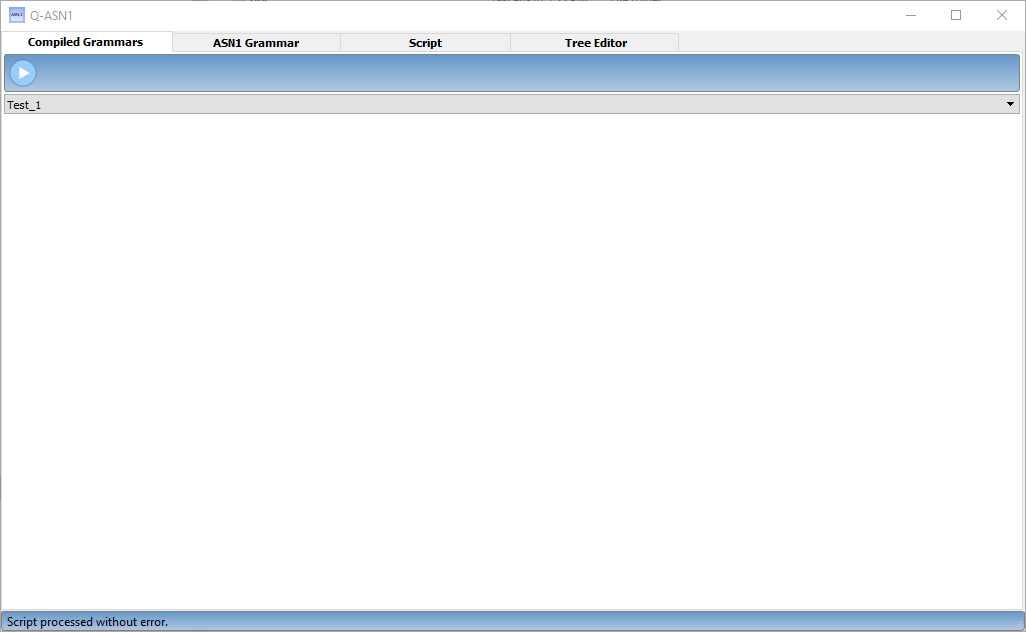
The interface for compiled grammars
This tab is of interest if you added some of your grammars to the compiled grammars list. In order to do so, you will have to recompile Q-ASN.1 after integrating some changes. The list of compiled grammars is located in the source file «ASN1_Qt_gui/UI_GrammarComp.cpp », MakeCompGrammarPane(). Add the name of your grammar in the combo box list.
Then, in the file «ASN1_Qt_gui/UI_Main.cpp », CompToObj() will have to be extended with a call to the function returning you ASN.1 structure (the function GetGrammar(), in the C++ file generated by Q-ASN.1)
on the GUI, if you click on the 'play' arrow, you will be taken to the tree editor (fourth tab), which now contains the chosen structure
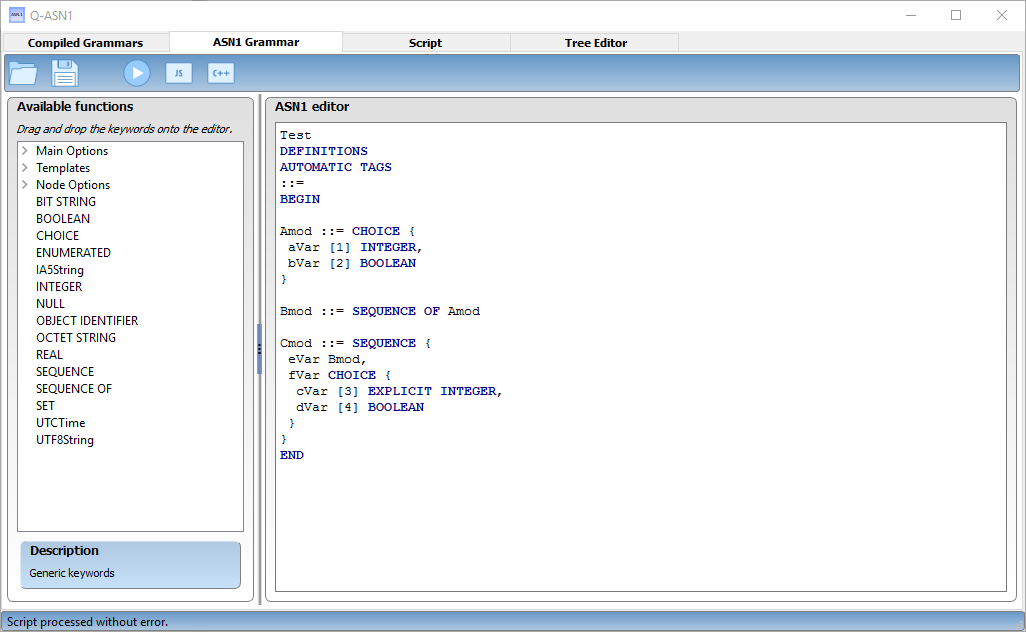
The interface for ASN.1 grammars edition
This editor helps you to make your ASN.1 grammar. Even though this tab will make your life easier, it is necessary to know a little bit about ASN.1 before starting. Once the ASN.1 script is written, you have several possibilities:
- load/save, as their names say, allow to save and load from an external file. Q-ASN.1 will not make automatic saves of your work, please think about doing so manually!
- convert into Javascript. If the grammar can be successfully compiled, the result will be a Javascript script which will be automatically displayed in the Javascript tab (third tab). If the ASN.1 cannot compile, the user will be notified.
- convert into C++. The verification mechanism is the same as for Javascript. If everything is correct, Q-ASN.1 will propose a location to save the generated C++ file. This file will be usable with ASN1_lib.dll or Q-ASN.1.
- the 'play' arrow redirects the user to the ASN.1 tree editor (fourth tab), without passing by the Javascript step. Behind the scene, of course, Q-ASN.1 still uses Javascript, which means that the performances will not be increased if you skip the Javascript tab, but it may be practical however to have a straight way form the ASN.1 editor to the tree editor.
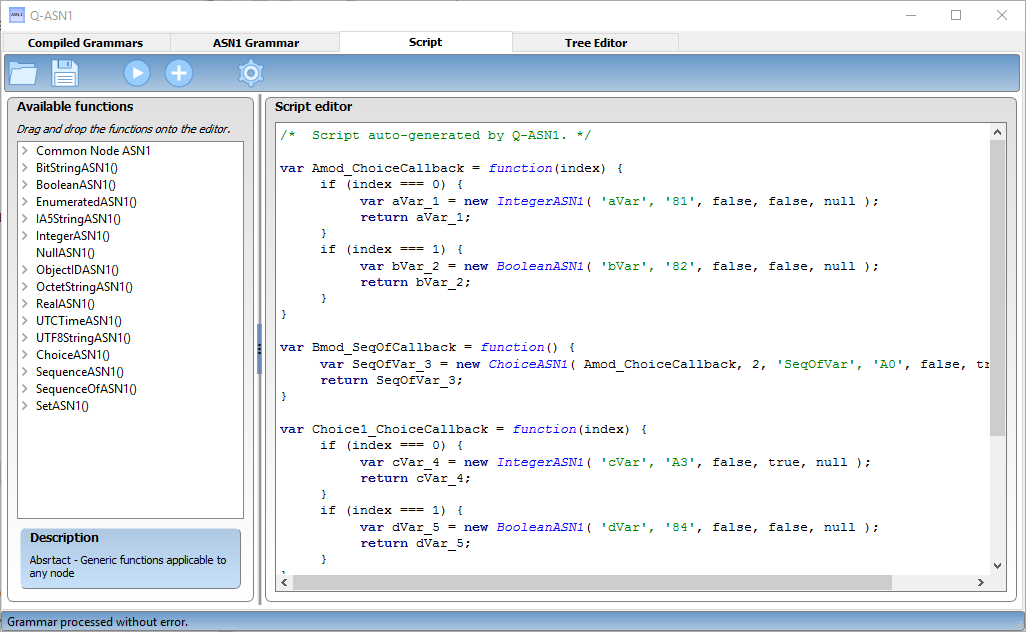
The interface for JavaScript scripts edition
Showing the Javascript code might not look very useful in a first place but it has two advantages:
- you can debug it.
- you can fill your structure with some values, with the help of the power of a programming language (of course Javascript in this case). It is true that the ASN.1 standard proposes a language to do that, but Q-ASN.1 unfortunately doesn’t support it.
The left panel summarizes the supported functions, with a description. It is possible to write directly an ASN.1 grammar using only Javascript, rather than in ASN.1, but it is not very interesting. You write code that is closer to what it will be in C++, but normally, if you wrote a correct ASN.1 grammar, there is no reason that it would be wrong in Javascript (in theory..!)
When the grammar is generated, you get an object which is the root of the tree, and from which you can navigate to any node you want and access the values.
This root object must be registered as the main node, otherwise the engine will not know. You must call registerGrammar() on it if you want to be able to see it in the tree editor (fourth tab). A warning will tell you if you forgot. You have to register the node only once, meaning that if you run additional scripts, the node will remain registered, you don’t have to do it again.
It is important to mention that the ASN.1 properties of a node in the structure cannot be modified after its generation (for example, the tag, the order in a SEQUENCE). It is logical since the ASN.1 structure is static, only the data is mutable. In other terms, it will not be possible to change an INTEGER node into a REAL node (you have to regenerate a grammar for that), but its value can be changed from an integer to another.
Javascript becomes interesting, as already mentioned, when it comes to fill the structure with values. This work can be fastidious if to be done in the tree editor. It can be reduced to nothing if everything is in a script. Javascript has access to the getters and setters of the values of all the nodes, and scripts can be run on the grammar very easily
The script may be saved and reused as long as the grammar does not change. The user has of course the possibility to use programming language features such as loops, conditions, or extra code.
The Javascript debugger of Qt may be attached if needed before executing the scripts. In order to do so, click the wheel in the tool bar and toggle the debug menu entry.
There are two ways of executing scripts:
- the « play » arrow, which instantiates a new Javascript engine, thus clearing anything that was run before, and runs the script
- the « plus » button, which executes an additional script, conserving the grammar and data from previous scripts. It allows, for example, to have a separate script for the grammar and for the values, and execute one after the other.
For one Javascript engine, you can have only one root node registered, thus only one structure in the tree editor. However, you can use the same structure and apply different values on it. It is necessary to clear the structure before by calling ClearDynamicData() on the root node. If you forget it, the SEQUENCE OF will keep their objects from the previous run.
After the execution of a script, you are redirected to the next tab where you will be able to view your data and serialize it.
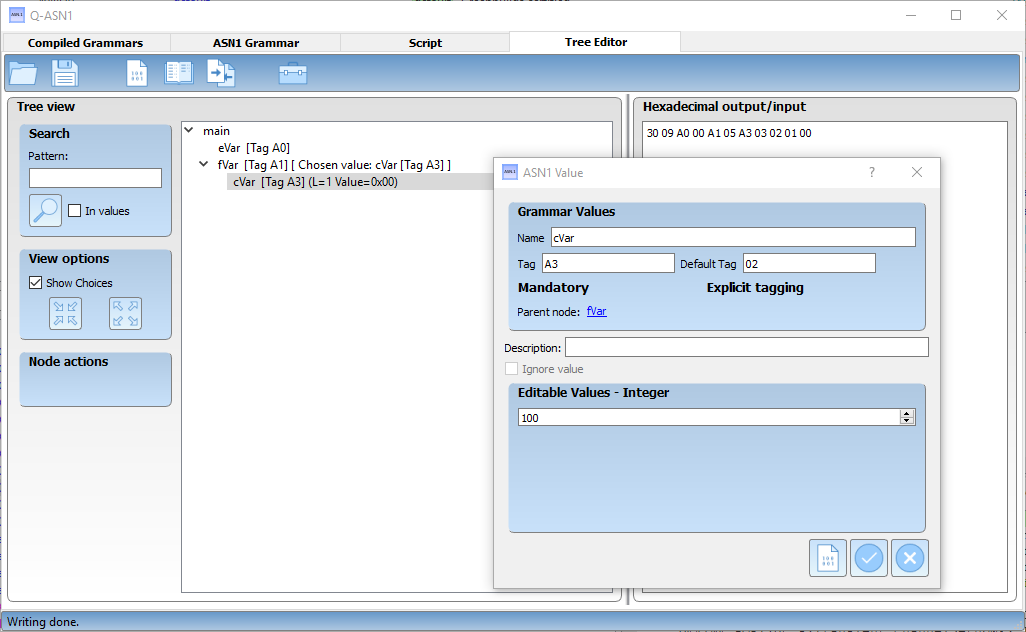
The window for the edition of an INTERGER node
This tree editor is a value editor. There is no possible way to modify the data structure. You will not be able to change an INTEGER into a REAL, nor modify its TAG. You will also not be able to add, delete, or modify the order of SEQUENCE variables.
Only mutable value may be changed at this step. If you want to modify the structure, you must go back to the grammar editor.
In the tree editor, you have the possibility to:
- change a value. For example, modify an IA5String from « aaa » to « bbb »
- Ignore an optional node. If the grammar accepts that a node can be present or not (OPTIONAL), the structure is not modified. It is sort of a « null » value, but still part of the values.
- add or remove objects in SEQUENCE OF. Here again, adding, moving, or removing in not modifying the data structure. The data structure indicates a list, but not the number of elements, nor their order. These attributes are part of the values.
- reorder the elements in SEQUENCE OF
- pick a choice from the possibilities in CHOICE (the possibilities are defined in the grammar. The picked choice is a value.)
- Fill the « description » field. This is not from the ASN.1 standard, and will not be serialized. This is just for convenience, you may fill it with whatever value you want to help you.
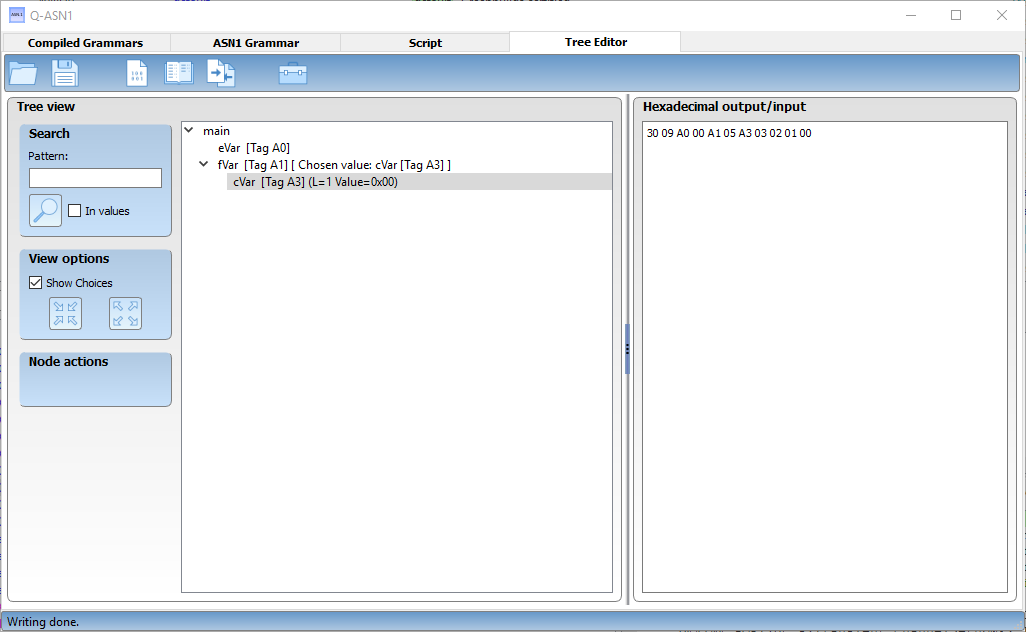
The window is composed of two panels. On the left, the tree, and on the right, a text field.
The text field can only contain hexadecimal characters. It will display the output of the serialization, but will be used also as input for the deserialization. It is then important to copy you data in an extern text editor to prevent any unwanted override. In the action bar, a menu proposes to open an hexadecimal file, or to save the content of the text field in a file.
In order to serialize the tree, you have to click on the corresponding button in the action bar (the paper sheet with some binary written on it). The whole tree is serialized and the result is displayed in the text field. It is also possible to only serialize a branch by right-clicking the desired root node and select the 'write from node' action.
In order to deserialize, you have to click on the book in the action bar. The content of the text field is read by the tree which will try to get values from it. This operation may fail if the given hexadecimal has not been generated with the same grammar. In this case the user is notified with the location of the unexpected data. If the operation is successful, the tree is filled with the data that has just been read. Like with serialization, you may deserialize only from a specific branch. The text field has to contain only the data of the branch.
Since ASN.1 works with bytes (2 hexadecimal characters), the text field must contain an even number of characters. In case it is odd, the user will be asked if he wants to pad the value with a 0 in the beginning. This correction does not make the value correct, it only makes it usable, you have strong chances that it not. You should double check your value.
The third action is for comparison (the 2 files with arrows facing each other). It will compare the content of the tree with the hexadecimal input. None of them is going to be modified in the process. If they contain the same values, the state bar will tell you so, otherwise a pop-up windows with the list of difference will be displayed.
The toolbox contains convenience converters. They display a window which allows to convert to an ASN.1 type to an its ASN.1 hexadecimal representation, and vice versa. Only the value is converted, there is no tag or length here. It is not possible to convert complex node as they would require a grammar definition, which you don’t have here. These converters are not linked to the tree at all, they will not make any modification in it.
The tree proposes several functionalities:
- the search. If the check box 'In values' is unchecked, the search will look in the name, the tag, and the description. This allows, for example, to search for a tag, say '81', and not be drowned in all the '81' that could be in the values. The search will look only in the hexadecimal values, not in their type representation: if an IA5String contains 'zzz', searching 'zzz' will not find it.
- showing or hiding the CHOICE nodes. It is sometimes practical to hide them in order to see directly the chosen node. Ticking this option will remove one level in the tree, under the CHOICE nodes. The grammar is not modified, it is only the graphical representation! You can display and edit them again if you disable the option.
- execute actions that specific to a node. The actions of the SEQUENCE OF and CHOICE have impacts on the tree branches, and it may be practical to edit them with these shortcuts. You have access to the shortcuts when you click on a node of these types in the tree. The right click context menu and the edit window shows these actions as well. The shortcut actions are for SEQUENCE OF, move up, move down, remove, and add, and for CHOICE, select choice.
Double click on a node in the tree will show the edit window of the value. As mentioned above, the CHOICE and SEQUENCE OF nodes will have the same actions as in the shortcuts. For the other types, there is an area where you can modify the value, which will be different based on the value type. It is not possible to edit directly the hexadecimal value. For OPTIONAL nodes, a check box allows you to ignore the node (then it will not be present in the serialization). Links to parent or children allow you to visualize them, but not to edit. In order to edit, you must open them from the tree.
For any simple type node (this excludes SEQUENCE, SEQUENCE OF, SET, CHOICE), there is a shortcut to open the corresponding type converter in the right click context menu. Doing something in the converter does not affect the value in the tree, it is only a helper tool.
As Q-ASN.1 is composed of several modules, you will have to choose the ones you need:
- ASN1_lib.dll : generate a structure from a compiled grammar (it can be generated by Q-ASN.1 or written by hand)
- ASN1_parser.dll : the ASN.1 compiler. From a ASN.1 grammar, it can generate a Javascript script usable by ASN1_Qt_Script_lib.dll (see below), or a C++ file, usable by ASN1_lib.dll (see above).
- ASN1_Qt_Script_lib.dll : read a Javascript file, and return a data structure that you can then use with ASN1_lib.dll
- ASN1_Qt_gui.exe : graphical executable tool which allow to play with you ASN.1 grammar and experiment with all the functionalities.
- ASN1_console.exe : test console executable. It contains a lot of example.
It is important to notice that ASN1_lib.dll and ASN1_parser.dll have no dependencies with Qt dlls. ASN1_Qt_Script_lib.dll needs QtCore.dll, and QtScript.dll to work. Obviously, ASN1_lib.dll is also needed to work with ASN1_parser.dll and ASN1_Qt_Script_lib.dll.
As the Q-ASN.1 sources are available, it is possible to recompile the dlls in your project if you want to use the C++ objects. But it is also possible to dynamically link the ASN1_lib.dll thanks to its C interface. A header file which get all the function pointers is available in the sources of the test program: DLL_Interface.h. It is written in C++ and might then require a few changes for other languages, but it could be a good starting point.
The source code of ASN1_console.exe shows examples with both methods.
Once the data structure is instantiated from the grammar, you have to fill it and serialize it.
the filling has to be done node by node. Depending on the type of the node, different functions may be accessed (for example: SetBooleanValue(const bool& val) will be available on a BOOLEAN node. As its name says, it sets the value of the node from the 'val' argument).
In order to walk in the tree (which corresponds to access the elements of the SEQUENCE, SEQUENCE OF, SET, or CHOICE), functions are accessible on these node. For example, you will find GetObjectAt(int index) on SEQUENCE, SEQUENCE OF, and SET, or GetSelectedChoice() to access the chosen value on CHOICE.
In order to serialize the tree, you need to call WriteIntoBuffer(ByteArray& buffer) on the root node. Or more generically, on the root of the branch you want to serialize.
Instead of filling data for serialization, you may want to extract data out of an hexadecimal value. The hexadecimal value must put in a ByteArray (you can easily build it from a character string, if it only contains hexadecimal characters). Calling ReadFromBuffer(const ByteArray& buffer, char* error, size_t errorBufferSize) on the root node will do the rest: the tree will be filled with the data contained in the buffer, if no error happen. If it fails (this happens if the grammar used to generate the buffer is not the same as the one used to generate the tree), you will get the list of encountered errors and the function returns false.
One the data is deserialized, they are accessible in the tree on the corresponding node, with the corresponding function (for example GetIntegerValue() on an INTEGER node).
The ByteArray type has a central place in Q-ASN.1 as it is used for any hexadecimal representation. Practical functions to manipulate it may be found in the ByteArray class. Important to note, Size() returns the size in byte, and not the number of characters (number of characters = 2 * number of bytes).
The file Utils.h defines several usual functions for conversions or verification, related to ASN.1.
Only the objects that are derived from the class ASN1_Object are exposed to the outside of the dll. It is not possible to access the class ASN1_Value or its derived classes. This is explained by the fact that the user must not manipulate hexadecimal data directly. In order to read or write a value, you have to use the real type of it. ASN1_Object works as an interface to hide an protect the technical behavior of ASN.1.